
How to Identify Phishing Emails - A Complete Guide to Email Security in 2024

Learn how to spot and protect against phishing emails with our comprehensive guide. Discover key warning signs, prevention strategies, and expert security tips to keep your business safe from cyber threats.

Garry BloomGarry Bloom · Founder & Senior IT Manager
9 January 2025
5 min read
Cybersecurity
Email Security
Phishing Prevention
IT Security
Identifying phishing emails

In today's digital landscape, phishing emails remain one of the most prevalent cybersecurity threats facing businesses. These deceptive messages, disguised as legitimate communications, can compromise sensitive data and cause significant financial damage. Understanding how to identify and protect against phishing attempts is crucial for maintaining your organization's security. Want to evaluate your current security measures? Take our free security assessment.


What is Phishing?

Phishing is a sophisticated form of cyberattack where criminals attempt to trick recipients into revealing sensitive information such as passwords, credit card details, or company data. According to recent data from IBM's Security Report, 90% of data breaches begin with phishing attacks, making it a critical security concern for businesses of all sizes.


Key Signs of a Phishing Email 🚩


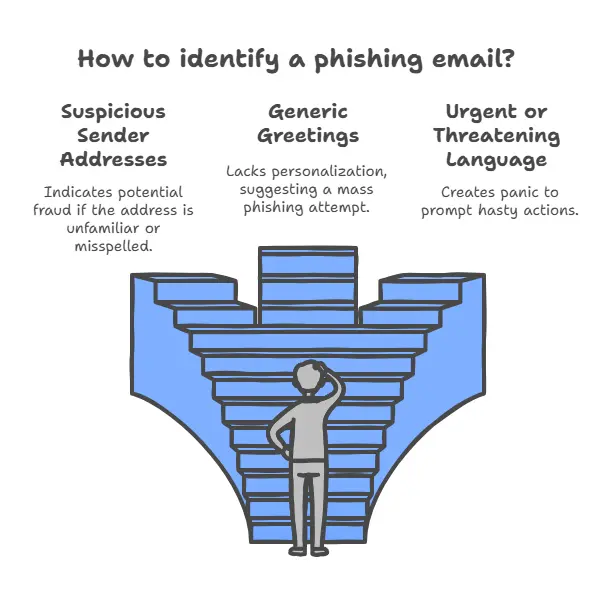
1. Suspicious Sender Addresses

  • Legitimate organizations use professional email domains (e.g., [email protected])
  • Watch for slight variations like [email protected]
  • Always verify the sender's full email address, not just the display name

2. Generic or Impersonal Greetings

  • Be wary of "Dear Sir/Madam" or "Dear Customer"
  • Legitimate businesses typically use your actual name
  • Generic greetings often indicate mass-sent phishing attempts

3. Urgent or Threatening Language

Common pressure tactics include:

  • "Your account will be suspended immediately"
  • "Final warning before legal action"
  • "Limited time offer - Act now!"

4. Grammar and Spelling Errors

  • Professional organizations proofread their communications
  • Multiple typos or awkward phrasing suggest potential fraud
  • Poor formatting or inconsistent branding are red flags

  • Hover over links to preview URLs before clicking
  • Be cautious of unexpected attachments
  • Watch for slight misspellings in domain names

Protecting Your Business 🛡️


Implement Strong Security Measures

  1. Enable Two-Factor Authentication (2FA)
  2. Use robust spam filtering solutions
  3. Keep software and systems updated
  4. Deploy comprehensive backup solutions

Employee Training Best Practices

  • Regular security awareness training
  • Simulated phishing exercises
  • Clear reporting procedures for suspicious emails
  • Ongoing updates about new threats

How We Can Help

At IT Support Perth, we offer comprehensive protection against phishing and other cyber threats:

  1. Advanced Email Security

    • Enterprise-grade spam filtering
    • Real-time threat detection
    • Automated security updates
  2. Employee Training Programs

    • Interactive security workshops
    • Regular phishing simulations
    • Best practice guidelines
  3. 24/7 Security Monitoring

    • Continuous threat assessment
    • Rapid incident response
    • Regular security audits

Ready to strengthen your email security? Contact us for a comprehensive security assessment or take our free security evaluation today.


Frequently asked questions

Phishing attacks account for more than 90% of all data breaches, according to recent cybersecurity reports. Small and medium-sized businesses are increasingly targeted due to often having fewer security measures in place.

Don't click any links or download attachments. Report the email to your IT department or security team immediately. If you've already clicked a link or entered information, change your passwords and notify your IT support immediately.

Yes, sophisticated phishing emails can sometimes bypass basic spam filters. This is why it's crucial to have multiple layers of security, including advanced email filtering, employee training, and robust security protocols.

Implement comprehensive email security solutions, provide regular employee training, enable two-factor authentication, and maintain up-to-date security systems. Consider partnering with an IT security provider for professional protection.

Current trends include AI-generated phishing emails, mobile-focused attacks, and sophisticated spear-phishing targeting specific employees. Attackers are also increasingly impersonating trusted business tools and services.
Garry Bloom
Written by
Garry Bloom
Founder & Senior IT Manager · 25+ years in IT

Garry founded Computer Mechanics — the business behind IT Support Perth — in 1997. With more than 25 years in IT management and support across internal and external service environments, he leads the team's technical direction and its cybersecurity and managed-IT strategy for Perth businesses.

Meet the IT Support Perth team →
Garry Bloom
9 January 2025
5 min read
Cybersecurity
Email Security
Phishing Prevention
IT Security

Stay Updated with IT Insights

Get the latest cybersecurity tips and technology insights delivered to your inbox

Related Articles

4 IT Gaps Small Businesses Overlook (and How to Close Them)

Most Perth businesses aren't undone by one huge disaster — it's the small IT gaps that stack up: missing MFA, delayed patching, old access nobody removed, and untested backups. Here's how teams under 50 users can close them. From Computer Mechanics, Perth IT specialists since 1997.

5 min read

How to Safely Offboard an Employee (and Protect Your Company Data)

When a staff member leaves, their access is a security risk until it's properly closed off. A practical Perth-business checklist for offboarding an employee without losing data or leaving a door open. From Computer Mechanics, Perth IT specialists since 1997.

5 min read

5 Signs Your Business Has Outgrown Your Current IT Guy

One trusted 'IT guy' works — until it doesn't. Here are five clear signs a Perth business has outgrown break-fix IT and needs a proper managed IT team. From Computer Mechanics, Perth IT specialists since 1997.

5 min read

Need Expert IT Support?

Get personalized advice from our Perth IT experts. Free consultation available.

Related Content

Continue Reading

Explore more insights and expert advice on IT support, cybersecurity, and digital transformation

Your Messages Are "Encrypted" — But the FBI Just Read Them Anyway. Here's What Every Perth Business Needs to Know.
CyberSecurity
ITSupportPerth

Your Messages Are "Encrypted" — But the FBI Just Read Them Anyway. Here's What Every Perth Business Needs to Know.

Most small business owners believe end-to-end encryption means their messages are completely private. A recent FBI case proves that assumption is dangerously incomplete.

5 min read
4/15/2026
What’s new in SMB1001:2026?
SMB1001
SMB10012026

What’s new in SMB1001:2026?

SMB1001:2026 updates for Perth SMBs: Mandatory DMARC from Silver tier, 5 maturity levels, Essential Eight alignment. Get certified, cut insurance costs, win tenders—start your roadmap today!

5 min read
2/25/2026
Deepfake Voice Scams: The AI Fraud Threat Perth Businesses Can't Ignore
Cybersecurity
AI

Deepfake Voice Scams: The AI Fraud Threat Perth Businesses Can't Ignore

AI can now clone a voice from seconds of audio, and businesses are losing millions to fake 'CEO' calls. Here's how deepfake scams work, why Perth SMBs are targets, and the simple process that stops them. From Computer Mechanics, Perth IT specialists since 1997.

5 min read
7/13/2026