
Understanding Layers of Security in Computer and Network Systems - 2025 Guide

Discover how layered security and Multi-Factor Authentication (MFA) protect your business from cyber threats. Learn about the essential security layers every organization needs and how to implement them effectively.

Garry BloomGarry Bloom · Founder & Senior IT Manager
9 January 2025
5 min read
Cybersecurity
Network Security
MFA
IT Security
Layers of computer and network security

In today's interconnected world, securing your business's digital infrastructure requires a multi-layered approach. As cyber threats evolve, no single security measure can provide complete protection. Want to evaluate your current security measures? Take our free security assessment.


What is Layered Security?

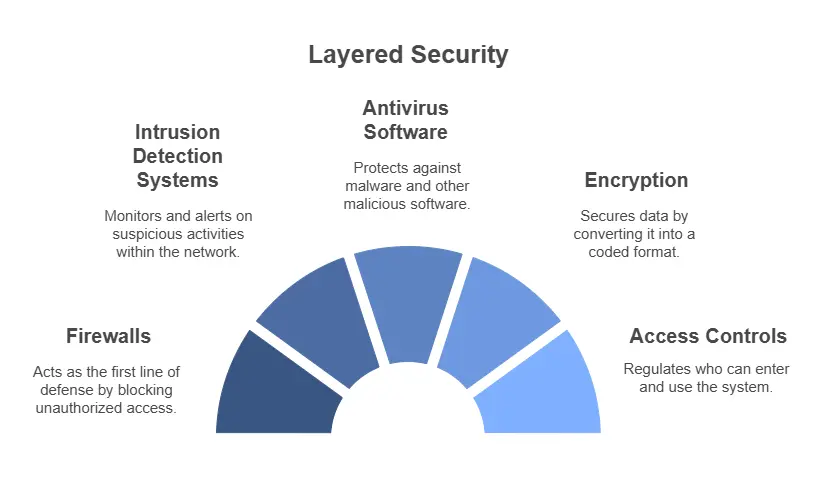
Layered security, also known as "defense in depth," involves implementing multiple security measures across your IT systems. Each layer acts as a barrier, ensuring that if one defense is breached, others remain to protect your data and network.

According to Australian Cyber Security Centre, organizations should implement multiple layers of security controls to effectively protect against cyber threats.


The Layers of Computer and Network Security 🛡️


1. Physical Security


2. Perimeter Security


3. Endpoint Protection


4. Network Security


Multi-Factor Authentication (MFA) 🔐

MFA is a crucial security layer requiring users to verify their identity using multiple authentication factors:

  1. Something You Know

    • Passwords
    • PINs
    • Security questions
  2. Something You Have

    • Mobile devices
    • Security tokens
    • Smart cards
  3. Something You Are

    • Fingerprints
    • Facial recognition
    • Voice verification

Implementation Strategy

Best Practices for Layered Security

  1. Regular security audits
  2. Continuous monitoring
  3. Employee training
  4. Comprehensive backup solutions

MFA Implementation Steps


How We Can Help

At IT Support Perth, we offer comprehensive security solutions:

  1. Security Assessment

    • Infrastructure evaluation
    • Vulnerability scanning
    • Risk assessment
  2. Implementation

    • Custom security architecture
    • MFA deployment
    • Employee training
  3. Ongoing Support

    • 24/7 monitoring
    • Incident response
    • Regular updates

Ready to strengthen your security? Contact us for a comprehensive security assessment or take our free security evaluation today.


Frequently asked questions

There's no single 'most important' layer - effective security requires multiple layers working together. However, strong access controls and employee training often form the foundation of a robust security strategy.

Costs vary based on your business size and needs. We offer flexible solutions that can be scaled to match your budget while ensuring comprehensive protection.

Yes, MFA is crucial for businesses of all sizes. According to Microsoft, MFA can block 99.9% of automated attacks, making it one of the most cost-effective security measures available.

Implementation timeframes vary but typically range from a few days to several weeks, depending on your infrastructure's complexity and specific requirements.

Current trends include AI-powered threat detection, zero-trust architecture, and cloud-native security solutions. We stay updated with the latest technologies to provide cutting-edge protection.
Garry Bloom
Written by
Garry Bloom
Founder & Senior IT Manager · 25+ years in IT

Garry founded Computer Mechanics — the business behind IT Support Perth — in 1997. With more than 25 years in IT management and support across internal and external service environments, he leads the team's technical direction and its cybersecurity and managed-IT strategy for Perth businesses.

Meet the IT Support Perth team →
Garry Bloom
9 January 2025
5 min read
Cybersecurity
Network Security
MFA
IT Security

Stay Updated with IT Insights

Get the latest cybersecurity tips and technology insights delivered to your inbox

Related Articles

4 IT Gaps Small Businesses Overlook (and How to Close Them)

Most Perth businesses aren't undone by one huge disaster — it's the small IT gaps that stack up: missing MFA, delayed patching, old access nobody removed, and untested backups. Here's how teams under 50 users can close them. From Computer Mechanics, Perth IT specialists since 1997.

5 min read

How to Safely Offboard an Employee (and Protect Your Company Data)

When a staff member leaves, their access is a security risk until it's properly closed off. A practical Perth-business checklist for offboarding an employee without losing data or leaving a door open. From Computer Mechanics, Perth IT specialists since 1997.

5 min read

5 Signs Your Business Has Outgrown Your Current IT Guy

One trusted 'IT guy' works — until it doesn't. Here are five clear signs a Perth business has outgrown break-fix IT and needs a proper managed IT team. From Computer Mechanics, Perth IT specialists since 1997.

5 min read

Need Expert IT Support?

Get personalized advice from our Perth IT experts. Free consultation available.

Related Content

Continue Reading

Explore more insights and expert advice on IT support, cybersecurity, and digital transformation

Your Messages Are "Encrypted" — But the FBI Just Read Them Anyway. Here's What Every Perth Business Needs to Know.
CyberSecurity
ITSupportPerth

Your Messages Are "Encrypted" — But the FBI Just Read Them Anyway. Here's What Every Perth Business Needs to Know.

Most small business owners believe end-to-end encryption means their messages are completely private. A recent FBI case proves that assumption is dangerously incomplete.

5 min read
4/15/2026
What’s new in SMB1001:2026?
SMB1001
SMB10012026

What’s new in SMB1001:2026?

SMB1001:2026 updates for Perth SMBs: Mandatory DMARC from Silver tier, 5 maturity levels, Essential Eight alignment. Get certified, cut insurance costs, win tenders—start your roadmap today!

5 min read
2/25/2026
4 IT Gaps Small Businesses Overlook (and How to Close Them)
Cybersecurity
Small Business

4 IT Gaps Small Businesses Overlook (and How to Close Them)

Most Perth businesses aren't undone by one huge disaster — it's the small IT gaps that stack up: missing MFA, delayed patching, old access nobody removed, and untested backups. Here's how teams under 50 users can close them. From Computer Mechanics, Perth IT specialists since 1997.

5 min read
7/16/2026